Self-hosting my website
Table of contents
Going my own way
For the past decade I've used this website for intermittent blogging, updating my CV, as a contact point for some consulting work, but I don't spend a lot of time on it.
I love having a personal website, and I love that the blog posts I do have seem to help people (I still get dozens of daily hits on my various posts about AI/Navigation in UE4). But I don't really spend all that much time blogging, and yet I have paid through the nose for services I barely use, which are bloated and slow, and I am steadily losing trust in.
So, although my day job is managing teams of game engine developers to make some really cool tech, I decided to finally brush off my web-dev and sysadmin skills, apply my love of optimisation, and dive into the details of a tech stack I'm less familiar with.
This post is more of a diary entry, rather than a tutorial. I'm chronicling what I've done, as well as why and how I've done it. It should show how joining the "indie web" isn't all that difficult if you're a little tech savvy.
Bottom line up front?
- Blog posts transfer 99% less data and load in 4% of the time
- Costs went from ~USD$450 to ~EUR€180 per year (>50% savings)
- More control over my data (tracking fewer things, in GDPR safe places)
- My "own" server I can tinker with
And most importantly - I learned a lot - and I love learning!
Motivation
I had a perfectly working website, why would I go through the hassle of self hosting?
Firstly, I've been paying about $450 USD per year to Squarespace for a website (~$280), my domain name (~$80), and my google workspace (~$85). Both Squarespace and Google Workspace provide a plethora of features that I don't really need - I don't need a visual editor for blog posts I author in markdown anyway.
Secondly, my website's performance was abysmal.
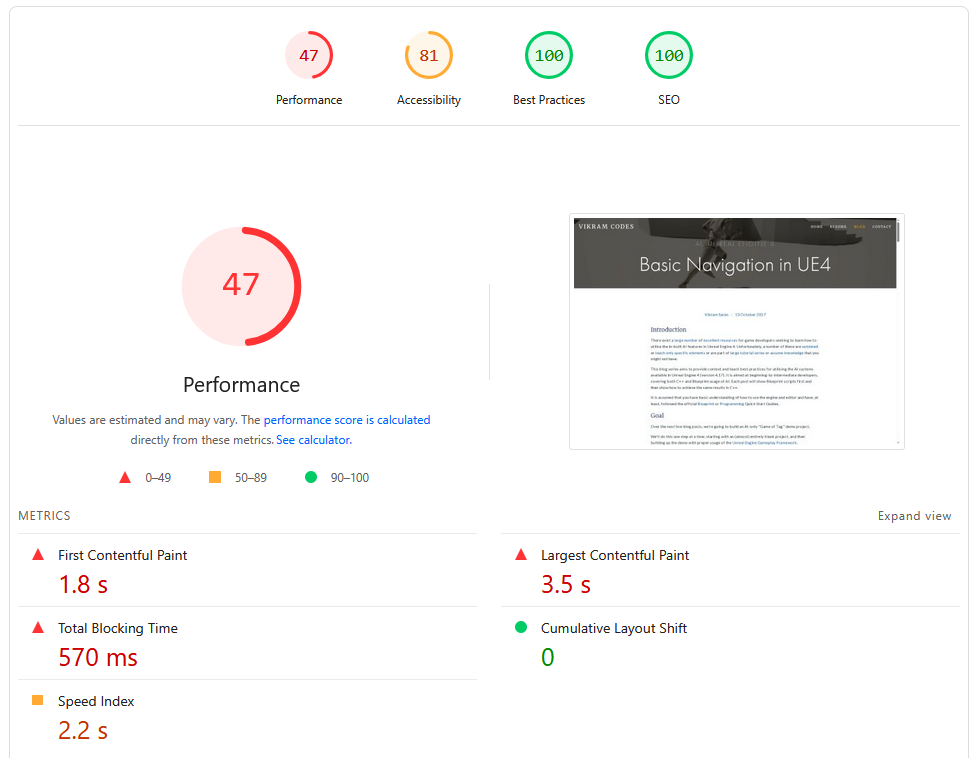
It transfers ~61.84 MB over 100 HTTP requests, and sometimes takes more than 10 seconds to finish fetching all network data. The "Load" Event takes nearly 2 seconds to occur.
An LLM tried to tell me that "In the world of web dev, 2 seconds for a load event isn't actually that bad" - maybe for a dynamic website, not a blog!
Thirdly, with the state of international politics right now, I wanted to bring my data under my own control - to try and achieve "digital sovereignty". My squarespace website had heaps of javascript frameworks, google analytics, and other things I find annoying as a user. I'd rather replace it with simple server-side stats, no cookies, and no third-party scripts.
Finally... I like tinkering. Having my own server to play around with is highly appealing to me. Well, technically I already have a couple of servers at home - but maintaining something that's "live" and used by other people is always a lot more interesting to me. I wanted to own my own web footprint. I wanted to see how it all fit together and ticked. I wanted to optimise, tinker, break it, and make it better.
So to flip those frustrations into goals (in no particular order):
- Save a bit of money in my hosting
- Be "blazingly fast" 🔥🚀
- Use the modern web (e.g. HTML5
<details>) rather than bloated JS frameworks - Use IaC/DevOps best practices to enable the features I care about
- Simplicity and ease of use for myself
- The ability to add new things as I think of them
a.k.a. cheap, fast, using best practices, standards compliant, maintainable, and extensible. All of the things a Technical Director tries to make a product.
Tech Stack
Static Site Generator
This website is mostly a repository for blog posts, so using a static site generator to help with the markdown -> HTML step made sense. I don't need a full CMS.
I know a lot of people are building their SSG, but for me - to start with - I picked one off the shelf. After a bit of research, I chose Zola. I didn't spend a lot of time on this decision, something was better than nothing, and as long as it mostly worked out of the box, I could pick a template and write my own structures/CSS later. Considering I've heard that Hugo's templating engine is obtuse, I went with one I could eventually learn.
I started with the anemone template, but quickly forked it and replaced it with my own templates once I realised how trivial it was to do so (plus I could avoid using a git submodule!). I have a couple of little quality of life elements on my website that I wanted, and it was easy enough to use modern HTML, CSS, and a little bit of raw javascript to make them work (e.g. the floating Table of Contents).
Zola shortcode template example
I like accordions for details, and I use them thoroughly. On my old website I had some ugly javascript hacks to make them work nicely, but with modern HTML5 it's easy.
You set up an accordion.html template:
<details {% if open %}open{% endif %} {% if name %}name="{{name}}" {% endif %}>
  <summary>{{ summary | markdown(inline=true) }}</summary>
  <div class="accordion-content">{{ body | markdown | safe }}</div>
</details>
Which lets me do this in my markdown:
// Note: %'s replaced with & to avoid triggering the template engine
{& accordion(summary="Zola template example") &}

I like accordions for details, and I use them thoroughly.
On my old website I had some ugly javascript hacks to make them work nicely,
but with modern HTML5 it's easy.

...

{& end &}
On top of that, I was able to drop a bunch of weight in the data transfers by processing my images, sizing them properly (zola has a nice resize_image function), and using webp to reduce size further.
Deployment
I'm very comfortable with git and DevOps, I've worked in this area extensively, so it was natural for me to settle for GitLab to start off with.
Eventually I want to set up
giteaand some non-yaml CI solution, but I haven't seen anything that calls to me yet, so I'll do this another day. For now, GitLab with my home N150 NUC as a runner is plenty.
GitLab CI Setup
My initial CI setup was quite simple. A docker job:
variables:
  DOCKER_IMAGE : "$CI_REGISTRY/$CI_PROJECT_NAMESPACE/$CI_PROJECT_NAME"

default:
  image: $DOCKER_IMAGE:latest

docker:
  stage: docker
  image: docker:latest
  services:
    - docker:dind
  before_script:
    - echo "$CI_REGISTRY_PASSWORD" | docker login $CI_REGISTRY -u $CI_REGISTRY_USER --password-stdin
  script:
    - docker build -t $DOCKER_IMAGE:latest .
    - docker push $DOCKER_IMAGE:latest
  rules:
    - if: $CI_PIPELINE_SOURCE == 'merge_request_event'
      changes: [Dockerfile]
    - if: $CI_COMMIT_BRANCH == $CI_DEFAULT_BRANCH
A zola job:
build-zola:
  stage: build
  cache:
    key: zola-media-cache
    paths:
      - static/processed_images
  script:
    - zola check
    - zola build
  artifacts:
    paths:
      - public
  rules:
    - if: $CI_PIPELINE_SOURCE == 'merge_request_event'
    - if: $CI_COMMIT_BRANCH == $CI_DEFAULT_BRANCH
And a gitlab pages publish job:
publish-website:
  stage: publish
  script:
    - ls -la public
  artifacts:
      paths:
        - public
  pages: true
  rules:
    - if: $CI_COMMIT_BRANCH == $CI_DEFAULT_BRANCH
I also hooked up rendercv for automatically making pretty resume CVs, lychee for link checking, and markdownlint for completeness (also in pre-commit).
Once I had the website working on gitlab pages, I spent a bit of time porting my old content over. Easy enough, because I already used markdown for authoring content.
I didn't have to change too much, just switch from inline html to shortcodes and add some frontmatter. Fortunately, LLMs are pretty useful in this context.
Hardware
As much as I'd like to host from hardware at home, my ISP isn't that reliable, and I'd like to avoid pointing web traffic to my home network, so I'm renting a Hetzner VPS (CX23). This is a steal at €3 per month (and still okay even though it's just raised to €4).
As someone with not much infra/backend experience (especially public facing), I found their UI perfectly cromulent, and would recommend them whole heartedly. It's probably the smoothest hardware requisitioning system I've ever used.
Server Infrastructure
I'm moderately comfortable with *nix systems, but I thought I'd try something I've been reading a lot about and would like to learn - NixOS.
If you've not heard of it, Nix is a package management tool (and programming language) which is declarative - the IaC dream. NixOS takes it a step further. It's a GNU/Linux distribution that manages its own configuration entirely through the Nix language.
Although it took a bit of re-reading the docs, going through the "nix pills" (a tutorial for nix), and some LLM support, I've come to be pretty comfortable with messing around with my setup. If you are comfortable with programming or scripting, I think it's worth the plunge.
All of the following is done via .nix config files:
Setting up NixOS on a Hetzner VPS
Don't try and use nixos-infect, Hetzner has a great UI for loading various ISOs and booting from them, including a NixOS 25.04 image which I used to install the OS to the main drive and the MBR.
I wish I could have used cloud-init, but I didn't quite figure it out. And in order to reset your VPS and start with a new cloud-init config, you need to delete it and spin up a new one - a bit too much of a hassle.
The nicest thing here is I have a git repository set up for the /etc/nixos/ directory, so the entire server is trivial to reproduce in case of emergency.
Web Server
I wanted something super simple, and from what I could find online, Caddy is the best in that respect. It's fast, memory efficient, automatically sets up HTTPS/TLS certificates, and integrates easily with NixOS. This was much much easier than my dim memories of struggling with apache/nginx, and extending it later on was also equally easy.
Caddy in NixOS
The following snippet is more or less all I needed to start with.
  services.caddy = {
    enable = true;
    virtualHosts."vikram.codes" = {
      extraConfig = ''
        root * /var/www/vikram.codes
        file_server
        # Adding compression is as easy as
        encode zstd gzip

        # Technically this isn't quite right
        # But it's good enough for now - "respond to all errors with my 404 page"
        handle_errors {
          rewrite * /404.html
          file_server
        }
      '';
    };
It's even easy to handle the constant stream of bots sniffing for vulnerabilities in WordPress setups:
        @killbots {
          path *.php /wp-*
        }
        respond @killbots "Access Denied" 403
Finally, I spent a bit of time scraping my old website/sitemap for urls I'd need to redirect, and dumped them into a block:
services.caddy.virtualHosts."vikram.codes".extraConfig =
    lib.mkAfter ''
      redir /s/git-slides.pdf /blog/git-lfs-file-locking/git-slides.pdf permanent
      redir /s/spike-slides.pdf /blog/agile-spikes/spike-slides.pdf permanent
      # etc.
    ''
Security
I am certainly not an expert in security, but I have a couple of basics to help out.
Of course, there are fundamentals (use a firewall, only open specific ports, don't allow password-based SSH login, etc.), but I went a little beyond those.
Firstly, sops-nix to manage secrets for me.
Using sops-nix
At about this time I needed to switch to using nix "flakes". It's marked experimental, but it seems like plenty of people encourage their use.
  inputs = {
    nixpkgs.url = "github:nixos/nixpkgs/nixos-25.11";

    sops-nix.url = "github:Mic92/sops-nix";
    sops-nix.inputs.nixpkgs.follows = "nixpkgs";
  };

  outputs = { self, nixpkgs, sops-nix, ... }@inputs: {
    # 'my-host-name' must match 'networking.hostName'
    nixosConfigurations.my-host-name = nixpkgs.lib.nixosSystem {
      specialArgs = { inherit inputs; };
      modules = [
        ./configuration.nix
        # This makes the sops.* options valid in configuration.nix
        sops-nix.nixosModules.sops
      ];
    };
  };
At this point the rebuild command changes slightly to nixos-rebuild switch --flake .
Secondly, fail2ban to block bad actors.
Fail2Ban Setup
My fail2ban set up is nothing fancy, but I'd like to think it's functional:
  services.fail2ban = {
    enable = true;
    bantime = "1h";
    maxretry = 5;

    bantime-increment = {
      enable = true;
      formula = "ban.Time * math.exp(float(ban.Count+1)*banFactor)/math.exp(1*banFactor)"; # Exponential growth
      maxtime = "168h"; # 1 week
      overalljails = true;
    };

    jails = {
      caddy-4xx.settings = {
        enabled = true;
        port = "http,https";
        logpath = "/var/log/caddy/access-vikram.codes.log";
        backend = "polling";
        filter = "caddy-4xx";
        findtime = "30m";
        datepattern = ''"ts":(?P<timestamp>\d{10}\.\d+) '';
      };
      caddy-killbots.settings = {
        enabled = true;
        port = "http,https";
        logpath = "/var/log/caddy/access-vikram.codes.log";
        backend = "polling";
        filter = "caddy-killbots";
        findtime = "30m";
        maxretry = 1; # Immediate
        bantime = "8760h"; # 1 year
        datepattern = ''"ts":(?P<timestamp>\d{10}\.\d+) '';
      };
    };
  };
  environment.etc."fail2ban/filter.d/caddy-4xx.conf".text = ''
    [Definition]
    failregex = ^.*"remote_ip":"<HOST>".*"status":(404|403|401).*$
  '';
  environment.etc."fail2ban/filter.d/caddy-killbots.conf".text = ''
    [Definition]
    failregex = ^.*"remote_ip":"<HOST>".*"uri":"[^"]*(\.php|/wp-).*$
  '';
DNS and Monitoring
Finally, when I migrated my DNS registration and records away from Squarespace, I made the decision to split them up. I use gandi for registration, and deSEC to host my records.
Gandi is a bit more expensive than the US options, but not too much (~€100/year).
Using deSEC made it trivial to update my DNS records inside my nix config using their API. If my IP changes for any reason, e.g. in the future I migrate to my own hardware, it's all handled automatically.
Updating DNS records in NixOS
  systemd.services.update-dns = {
    script = ''
      set -euo pipefail
      TOKEN="$(cat ${config.sops.secrets.desec_token.path})"
      IP="$(${pkgs.curl}/bin/curl -fsS https://api.ipify.org)"
      [[ -z "$IP" ]] && echo "Could not fetch IP" && exit 1
      PAYLOAD="$(${pkgs.jq}/bin/jq -n --arg ip "$IP" '[
        {
          subname: "",
          type: "A",
          records: [$ip],
          ttl: 3600
        }
      ]')"

      echo "Current IP: $IP"
      echo "DNS Payload: $PAYLOAD"

      ${pkgs.curl}/bin/curl -fsS -X PATCH \
        https://desec.io/api/v1/domains/your.domain/rrsets/ \
        -H "Authorization: Token $TOKEN" \
        -H "Content-Type: application/json" \
        -d "$PAYLOAD"
    ''
Adding new subdomains is trivial from there. I've put some in for stats tracking using goaccess and uptime monitoring with Gatus.
The Migration
At this point I had everything ready to go. Parity with the website on gitlab pages. A server ready to host. A pipeline to get things from one to the other (I updated my gitlab-ci to rsync to my VPS).
To be honest, I might have muddled timelines and done some of the above later in the process - I'm writing this in retrospect.
Publishing from GitLab CI
deploy:
  stage: publish
  script:
    - rsync -avz --delete public/ $DEPLOY_USER@$DEPLOY_HOST:/var/www/vikram.codes/
I was expecting it to be a bit dramatic - some failures or outages... but it was pretty easy after all that setup. I got the transfer code from squarespace, waited a few days for my bank transfer to clear with gandi, moved my dns records to deSEC (but pointing at Squarespace to start with).
Once I was ready, I uncommented my NixOS update-dns script section the root domain, ran nixos-rebuild switch --flake ., and waited.
A few minutes of watching my DNS updates roll out, and that was it!
The hardest part was the psychology - double and triple checking that I hadn't missed anything.
Mail Server
The last part I didn't talk about above is migrating my email from Google Workspaces to mailbox.org. I don't use many workspace features, so this works well for me.
Because I went with a hosted solution, there's not a lot of technical detail here. Mailbox has a good set of docs about how to do it.
The cut-over process is more or less the same (set up the new system, keep MX/SPF/DKIM records pointed at the old host, cut over when tested, test that it hits the new endpoint), but with a manual copy step using Thunderbird to transfer my mail history across (sadly, the automated migration tool didn't work for me).
To ensure that your emails don't bounce, setting MX records along isn't good enough. Mailbox.org suggests setting SPF, DKIM, and DMARC as well. Note: You can't just copy-paste the values from the mailbox docs for deSEC - you need to ensure the
subnameis lowercase!
Results
My pages are close to 100 across the board in PageSpeed for the same post as before:
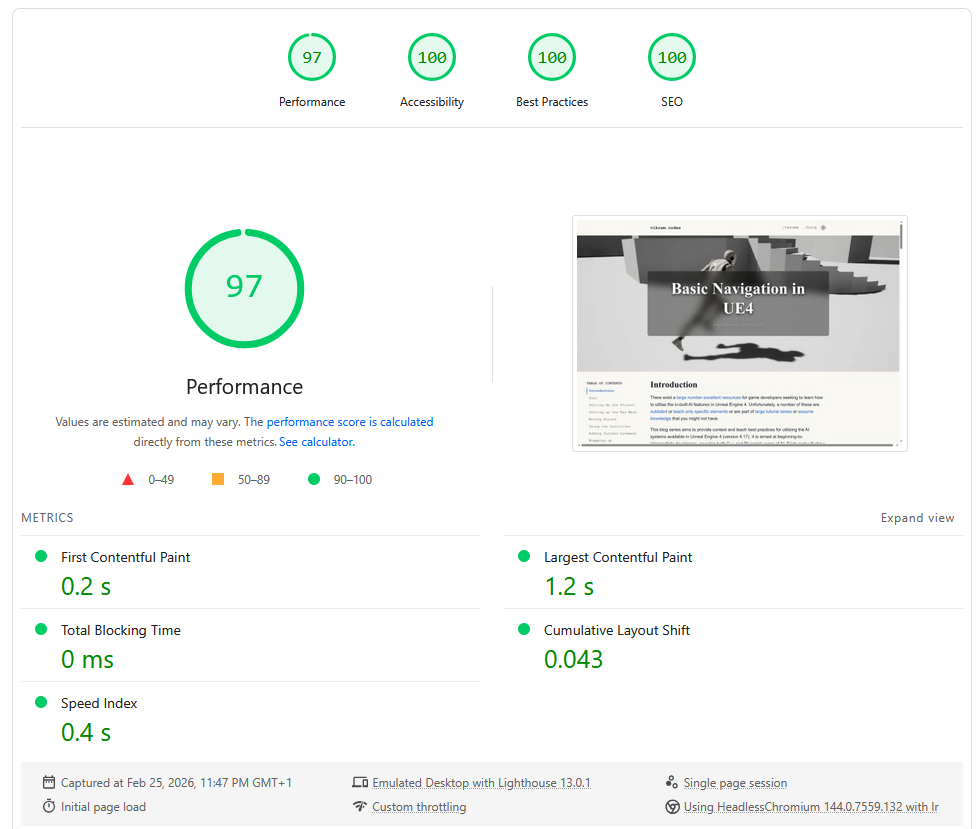
I do have straight 100s for my home page, but that's much easier.
I've dropped to under 500Kb total transfer, with it finishing in ~0.6s - and that's without bothering to have a CDN.
I'm pretty sure I could improve it even further if I fixed up my fonts.css and used variants, or dropped custom fonts altogether.
| Metric | Squarespace | NixOS + Zola |
|---|---|---|
| Total transfer | 61.8 MB | 663 KB |
| HTTP Requests | 100 | 12 |
| Load time | ~10s | <250ms |
| PageSpeed Performance | 47 | 97 |
| PageSpeed Accessibility | 81 | 100 |
All local tests were with a cold cache, private browser window, same version of Firefox
Everything that I care about is achieved:
- It's cheaper, by far
- ~€4pm for the VPS
- ~€30pa for the mail server
- ~€100pa for the domain
- It really is "blazingly fast" 🚀
- Robust content pipelines
- Greatly reduced digital footprint
- I know the whole thing inside and out, so maintenance is easy
- And I've already added a handful of services that I didn't bother with before
Next steps
As with many self-hosting/homelab projects, I get a lot of enjoyment just from tinkering.
So I'm going to keep doing that, adding new services (e.g. kanidm for identity management, a subdomain to host my drafts behind OAuth login, etc.), and continuing to learn and grow.
I have a few ideas on how I'd like to extend this, and I'm sure I'll come up with more:
- For now I'm happy to use mailbox.org, but eventually I'd like to consider hosting my own mailserver (CalDAV/CardDAV as well).
- With Discord asking for ID globally I'm interested in hosting my own XMPP server (or something else?).
- I'm also looking at moving my (and my family's) personal data out of Google Photos and Dropbox and investigating Immich/Seafile.
Final thoughts
Should you do this? Absolutely - if you're comfortable with learning the above, you don't need e-commerce or something dynamic, and want to bring back the early magic of the distributed web. Hopefully this blog post can help others try the same thing!
There is some risk - I am my own SRE, I don't have a CDN, and if anything goes wrong I'm on the hook myself - but to me the tradeoff is worth it. I have everything I need to spin up my website on a new VPS in a matter of hours, if not minutes.
Overall this took me maybe a week of effort spread over a couple of months - and I loved every part of doing it. The result, in my opinion, speaks for itself. As someone who cares about game engine performance, how can I not care about my website's performance too?
If you want a peek at my git repositories, or have suggestions for improvements, please reach out via email. Oh and if anyone reading this has a lobste.rs account, I'd love an invite.